PowerPoint: A Class Presentation That Holds Attention

A class presentation is your chance to teach your classmates something, not just to read slides aloud, and PowerPoint is the tool that helps you do it well. A good presentation has a clear message, slides that support what you say rather than repeating it, and a speaker who looks at the audience instead of the screen. Many students make the same mistakes: slides crammed with paragraphs, tiny text, and too many animations. This guide shows you a better way, from planning your message and designing clean slides to practising your delivery so you can present with confidence.
Plan Your Message Before Opening PowerPoint
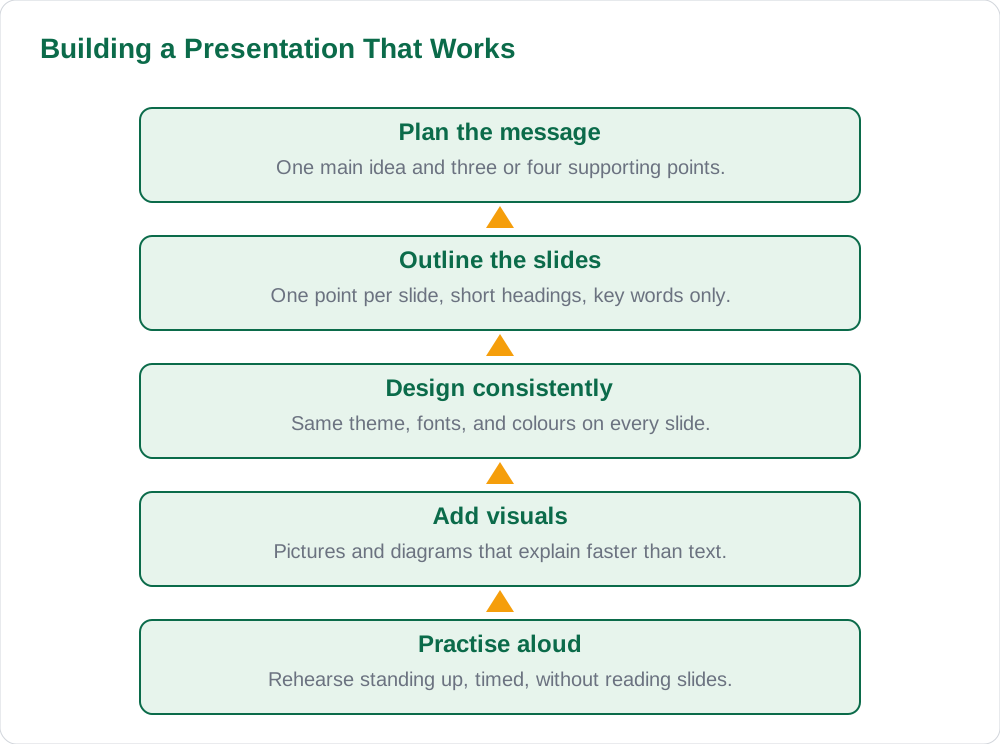
The biggest mistake in presentations is opening PowerPoint before knowing what you want to say. Start on paper instead: write one sentence that states your main message, then list three or four supporting points in a sensible order. For a presentation about the water cycle, the main message might be that water moves in a continuous cycle driven by the sun, and the supporting points would be evaporation, condensation, precipitation, and collection. This simple outline becomes the backbone of your talk, and every slide should serve one part of it.
Next, decide what belongs on slides and what belongs in your speech. Slides should carry short headings, key words, and pictures, while explanations, stories, and examples belong in what you say. A useful rule is that no slide should hold more than about six short lines of text, and the font should be large enough to read from the back of the classroom. If you find yourself copying whole paragraphs onto slides, stop and summarise: your audience came to hear you, not to read your slides while you stand silently beside them.
Designing Clean, Readable Slides
Clean design starts with consistency. Choose one theme or background for the whole presentation, one font for headings and one for body text, and a small set of colours that contrast well with the background, such as dark text on a light slide. Title slides should state the topic and your name, and content slides should follow the same layout pattern so the audience is never distracted by a new design on every slide. Consistency looks professional and lets the audience focus on your ideas instead of your decoration.
Pictures, charts, and diagrams earn their place when they explain something faster than words can. A labelled diagram of the water cycle teaches more in ten seconds than a paragraph describing it, and a simple chart can make a comparison obvious at a glance. Keep pictures large, relevant, and properly placed, with a short caption where needed. Avoid clip art overload, flashing animations, and sound effects, which entertain for a moment but pull attention away from your message. One gentle transition between slides is plenty for a class presentation.
Writing Slide Text That Supports Your Talk
Think of each slide as a signpost, not a script. A heading states the point, and three or four short bullets remind you what to explain, while the full explanation comes from you. For example, a slide about evaporation might say only Evaporation: sun heats water, water becomes vapour, vapour rises, and you would then explain each step in your own words. This approach keeps slides short, keeps the audience listening to you, and proves that you understand the topic rather than memorised a paragraph to read aloud.
Numbers and facts deserve the same discipline. Put only the figures that matter on the slide, and round them sensibly if the exact value is not important to your point. Never invent statistics, dates, or quotations for a presentation: if you are unsure of a fact, check your textbook or ask your teacher before you present it. A short sources slide at the end, naming your textbook and any other material you used, shows honesty and good study habits, and it protects you if a classmate questions a fact you stated.
Practising Delivery and Handling Nerves
Practice is what turns a good set of slides into a good presentation. Rehearse standing up, speaking aloud, and moving through the slides in order, at least twice before presentation day. Time yourself, because a talk that runs long in practice will run longer in front of an audience. Practising aloud also reveals sentences that sound awkward, slides that need a clearer heading, and places where you need a picture to help the audience follow you. Small cue cards with your main points can help you stay on track without reading from the slides.
Nerves are normal, and even experienced speakers feel them. Slow, steady breathing before you begin, eye contact with friendly faces around the room, and a calm opening sentence all help you settle. Speak a little more slowly than feels natural, pause briefly between points, and remember that your classmates want you to do well. If you lose your place, glance at your slide heading or cue card and continue; nobody expects perfection, and a calm recovery impresses an audience far more than a panicked rush. For more study help, explore Solved Notes and Books.
Presenting Day: Setup and Questions
On presentation day, arrive early enough to check the setup: open your file, run the slide show once, and make sure pictures and text appear correctly on the classroom screen. Keep a copy of your file on a USB drive as a backup, and know the keyboard shortcuts that matter: F5 starts the show from the beginning, the right arrow or spacebar moves forward, and Esc ends the show. Standing to one side of the screen, facing the audience rather than the projector, keeps you connected to your listeners and stops you from blocking the slides.
Questions at the end are a good sign, because they mean your audience was listening. Listen to the whole question before answering, answer honestly, and if you do not know something, say so and offer to find out, rather than guessing. Thank your audience when you finish, and invite feedback from your teacher about what to improve next time. A presentation is a skill that grows with every attempt, so each talk, good or bad, makes the next one stronger. Find more classroom resources on the [home page](/) and in the blog section.
AI Help: Muse AI
Muse AI is Meta's personal AI assistant, and it can help you prepare a class presentation by turning your topic into a clear slide outline with one main point per slide. You can ask it to suggest simple explanations for a difficult idea, to shorten a long paragraph into short bullets, or to draft practice questions your classmates might ask. Muse AI does not give official STBB answers — always verify against your STBB book and your teacher. Always verify against your Sindh Textbook Board book and your teacher before using anything in classwork.
Join Muse with invite code LTGSWD — in the Muse app, go to Settings > Redeem token and enter the code. Disclosure: LTGSWD is the author's Muse invite code.
5 key points you must know
- Plan your message on paper first: one main idea, three or four supporting points.
- Keep slides short: headings, key words, and pictures, never copied paragraphs.
- Use one consistent theme, fonts, and colours across the whole presentation.
- Practise aloud standing up, timed, at least twice before presentation day.
- Face the audience, speak slowly, and answer questions honestly.
Frequently asked questions
How much text should I put on one slide?
Aim for no more than about six short lines per slide, with a clear heading and short bullets. Slides are signposts that remind you what to explain, not scripts to read aloud. If a slide is full of paragraphs, summarise it into key words and move the explanation into your spoken talk.
How do I start a slide show in PowerPoint?
Press F5 to start the slide show from the beginning, or use the Slide Show tab to start from the current slide. Move forward with the right arrow key or the spacebar, move back with the left arrow key, and press Esc to end the show. Practise these keys before presentation day so you never fumble in front of the class.
What makes a good title slide?
A good title slide states the topic clearly, gives your name and class, and uses the same theme as the rest of the presentation. Keep it simple: a relevant picture is welcome, but a crowded title slide with many colours and animations distracts from your opening words. Your title slide sets the tone, so let it look calm and confident.
How can I stop feeling nervous before presenting?
Nerves are normal and they fade once you start speaking. Breathe slowly before you begin, practise aloud at least twice beforehand, and use cue cards with your main points so you never feel lost. Speak a little more slowly than feels natural and look at friendly faces around the room; your classmates want you to succeed.
What should I do if I do not know the answer to a question?
Answer honestly and say you do not know, then offer to find out and tell the class later. Guessing a wrong answer damages your credibility far more than admitting a gap. Teachers respect students who are honest about what they do not know, and a sincere answer keeps the question session friendly and useful for everyone.
Solved notes — preview free
These guides work best with the solved exercises. Preview the solved notes free on this website — 119 solved notes for Classes 6–10 in Sindhi, Urdu, English and Arabic medium. Or browse the full solved notes catalogue for your class and medium. New solved notes are added regularly — check the catalogue for coming-soon books.