Keyboard Typing Practice: Faster Fingers in 15 Minutes a Day
Typing is a skill that pays off in every subject, because students who type well finish assignments faster, make fewer mistakes, and spend their energy on ideas instead of hunting for keys. Most beginners type with two fingers while staring at the keyboard, which is slow and tiring. Touch typing, where your fingers learn the keys by position and your eyes stay on the screen, feels difficult for the first week but quickly becomes faster and far more comfortable. This guide explains correct finger placement, the home row method, and a simple fifteen-minute daily routine that builds real speed without boring drills.
Posture and Finger Placement First
Good typing starts before your fingers touch the keys. Sit upright with both feet flat on the floor, keep your wrists straight and relaxed rather than bent, and place the keyboard so your elbows rest at a comfortable angle. The screen should be at eye level and about an arm's length away, so you are not leaning forward or squinting. Poor posture causes tired hands and sore shoulders, and it slows you down, so fixing your sitting position is the first step, not an optional extra.
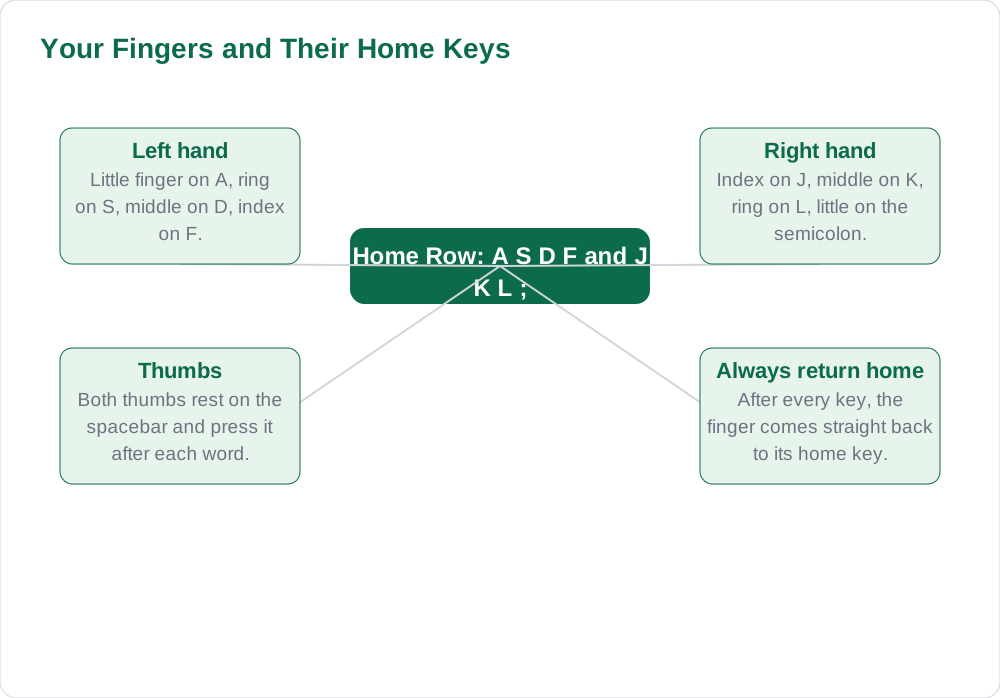
Finger placement follows a simple rule: each finger owns a set of keys, and fingers return to their home keys after every keystroke. Place your left fingers on A, S, D, and F, and your right fingers on J, K, L, and the semicolon key, with both thumbs resting on the spacebar. The F and J keys have small raised bumps so you can find home position without looking. At first this feels strange, and you will want to look down, but resisting that urge is exactly how your fingers learn the keyboard by touch.
The Home Row Method, Step by Step
The home row is the middle row of letters, and it is your base camp. From home position, your left little finger reaches for Q, A, and Z, your left ring finger for W, S, and X, your left middle finger for E, D, and C, and your left index finger for R, F, V, T, G, and B. The right hand mirrors this pattern on the other side, with the right index finger covering H, J, N, U, Y, and M. You do not need to memorise this table at once: learn one row of keys at a time, and practise slowly until each finger moves without thought.
The top row and bottom row are reached by stretching the nearest finger up or down and then returning to home position immediately. The most common beginner mistake is leaving fingers stranded on the top row, which breaks the pattern and forces you to look down again. A good rule is that after every key, the finger comes home. Practise with real words rather than random letters when you can, because typing words you know teaches your fingers the common patterns of English, such as th, ing, and tion, which appear again and again in schoolwork.
A 15-Minute Daily Practice Routine
Fifteen focused minutes a day beats an hour once a week, because typing skill grows through regular repetition. Divide your session into three five-minute parts. First, warm up slowly on the home row, typing simple words and focusing on correct fingers rather than speed. Second, practise a short passage from your textbook, typing it exactly as written, which trains both accuracy and the common letter patterns of real English. Third, try a free typing tutor program or website, if your teacher approves, and complete one lesson or timed exercise.
Accuracy always comes before speed, and this is the rule most beginners break. Typing fast with many errors means you spend more time correcting than you saved, and it trains bad habits that are hard to undo. Aim to type a passage with no more than two or three errors before trying to go faster, and slow down whenever your error rate climbs. Keep a simple record, such as your words per minute and error count once a week, and you will see steady improvement that motivates you to continue.
Common Mistakes and How to Fix Them
The most common mistake is looking at the keyboard, which feels helpful but prevents your fingers from learning key positions. Cover your hands with a cloth or a piece of cardboard during practice if you cannot stop peeking, and remove it only when you no longer need it. Another common mistake is pressing keys too hard, which tires your hands and slows you down; a light, relaxed touch is both faster and more comfortable. If one finger keeps missing its keys, spend an extra few minutes on words that use that finger until it catches up.
Typing with only two fingers, often called hunt and peck, is comfortable in the short term but limits your speed permanently, so it is worth switching to touch typing even though the first week feels slower. Do not practise when your hands are tired or sore: take a short break, stretch your fingers, and return fresh. If you share a computer, check that the keyboard layout matches what you practised on, because switching between very different keyboards can confuse beginners. Patience is part of the method: most students notice real improvement within two to three weeks of daily practice.
Using Typing Skill in Real Schoolwork
Once touch typing feels natural, use it everywhere: type your homework drafts, class notes, and revision summaries on the computer instead of only practising drills. Real schoolwork is the best practice, because it uses the vocabulary and sentence patterns you actually need. You will notice assignments take less time, your writing becomes neater, and you can revise by editing text instead of rewriting whole pages by hand. These benefits grow with every term, and they carry into examinations and later working life.
Typing skill also supports other computer skills: it makes word processing, spreadsheets, presentations, and email all faster and less frustrating. Set yourself small goals, such as typing one paragraph of homework without looking at the keys, and celebrate when you reach them. Keep practising a few minutes a day even after you feel competent, because speed and accuracy fade without use. For more computer guides, explore Solved Notes, Books, and the blog section.
AI Help: Muse AI
Muse AI is Meta's personal AI assistant, and it can help you practise typing by giving you short passages to type, such as a paragraph from a general topic at your reading level. You can ask it to create simple practice sentences that use the home row keys, or to suggest a weekly routine that fits your homework schedule. Muse AI does not give official STBB answers — always verify against your STBB book and your teacher. Always verify against your Sindh Textbook Board book and your teacher before using anything in classwork.
Join Muse with invite code LTGSWD — in the Muse app, go to Settings > Redeem token and enter the code. Disclosure: LTGSWD is the author's Muse invite code.
5 key points you must know
- Sit upright, wrists straight, screen at eye level, before you start typing.
- Place left fingers on A S D F and right fingers on J K L and semicolon.
- After every keystroke, return the finger to its home key immediately.
- Practise 15 minutes daily: warm up, type a real passage, then one tutor exercise.
- Accuracy before speed: slow down whenever errors rise, and track progress weekly.
Frequently asked questions
What is touch typing?
Touch typing means typing without looking at the keyboard, because your fingers know each key by position. Each finger owns a set of keys and returns to its home key after every keystroke. It feels slow for the first week, but it soon becomes much faster and more comfortable than typing with two fingers while staring at the keys.
Where do my fingers go on the keyboard?
Your left fingers rest on A, S, D, and F, and your right fingers rest on J, K, L, and the semicolon key, with both thumbs on the spacebar. The F and J keys have small raised bumps so you can find this home position by touch. From home position, each finger stretches to its neighbouring keys and then returns home.
How long does it take to learn touch typing?
Most students notice real improvement within two to three weeks of fifteen minutes of daily practice. The first week feels slow and awkward, which is normal, because your fingers are learning new habits. Regular short practice works far better than one long session a week, so keep the routine daily even when progress feels slow.
Should I practise speed or accuracy first?
Accuracy always comes first. Typing fast with many errors wastes the time you saved on corrections and trains bad habits that are hard to undo. Aim for a passage with only two or three errors before trying to go faster, and slow down whenever your error rate climbs. Speed follows naturally once accuracy is solid.
How can I stop looking at the keyboard?
Cover your hands with a cloth or a piece of cardboard during practice so peeking is impossible. Start with slow home row exercises where you already know the finger positions, and only remove the cover when you no longer need it. Looking down feels helpful in the moment, but it is the main habit that prevents your fingers from learning the keys.
Solved notes — preview free
These guides work best with the solved exercises. Preview the solved notes free on this website — 119 solved notes for Classes 6–10 in Sindhi, Urdu, English and Arabic medium. Or browse the full solved notes catalogue for your class and medium. New solved notes are added regularly — check the catalogue for coming-soon books.