Internet Safety Rules Every Student Must Know
The internet is a wonderful tool for learning, but it also has risks that every student should understand before going online. A single careless click, a shared password, or a photo posted in anger can cause problems that last far longer than a moment. Internet safety is not about fear; it is about a handful of clear habits that protect your privacy, your money, your reputation, and your peace of mind. This guide explains the most important rules in plain language, with examples students actually meet, so you can enjoy the internet's benefits while avoiding its common traps.
Protect Your Passwords and Accounts
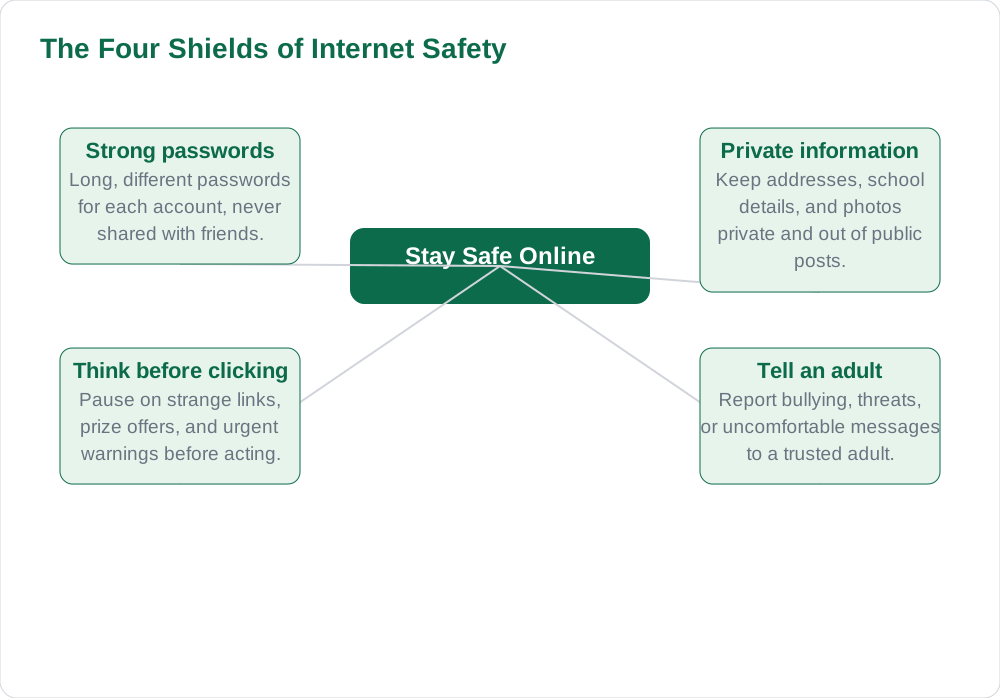
Your password is the key to your account, and a weak or shared password is like leaving your house door open. Use a different password for each important account, make it long, and mix letters, numbers, and symbols so it is hard to guess. Never share your password with friends, even close ones, and never type it on a shared or public computer without signing out afterwards. If a website offers two-step verification, turn it on, because it adds a second check, such as a code on your phone, that protects you even if someone learns your password.
Be careful with password reset messages and login pages. If you receive a message claiming your account will close unless you click a link, do not click it; instead, open the website yourself by typing its address and check your account there. Fake login pages are designed to look real, but their addresses are slightly wrong, and entering your password there hands it to a stranger. When in doubt, ask a parent or teacher before clicking, because a few seconds of caution can save an account that took years to build.
Guard Your Personal Information
Personal information includes your full name, home address, school name, phone number, photos, and daily routine, and sharing it publicly can put you at risk. Check the privacy settings on every app you use, and set your profiles to private so only people you approve can see your posts. Think before posting a photo: school uniforms, street signs, and house numbers in the background can reveal where you study and live, even when the caption says nothing. Once something is posted online, it can be copied and shared beyond your control, so post only what you would be comfortable with a stranger seeing.
Be especially careful with quizzes, games, and forms that ask for personal details in exchange for a prize or a fun result. Many of these are designed to collect information for advertising or worse, and a prize that seems too good to be true usually is. Never fill in your phone number, address, or school details on an unfamiliar website, and never send personal photos to someone you met online, no matter how friendly they seem. If anyone online asks you to keep a conversation secret from your parents, that is a warning sign: stop and tell a trusted adult immediately.
Spotting Scams, Fake News and Clickbait
Scams often arrive as exciting offers, urgent warnings, or messages pretending to be from a friend, a bank, or a famous person. Common warning signs include spelling mistakes, strange web addresses, demands for quick action, and requests for money, passwords, or personal details. A message saying you have won a prize you never entered is almost certainly a trick. The safest response is to ignore it, delete it, and never reply, because replying tells the sender that your account is active and invites more attempts.
Fake news spreads the same way, through dramatic headlines designed to make you share before thinking. Before believing or forwarding a shocking claim, check whether a trusted news source or your textbook confirms it, and look for the original source rather than a screenshot. Sharing false news about exams, results, or health can worry many people and damage your own credibility. A good rule for students is simple: if a post makes you angry or excited, pause and verify before you share, and if you cannot verify it, do not pass it on.
Be Kind and Responsible Online
Cyberbullying means using messages, posts, or pictures to hurt, embarrass, or threaten someone, and it can cause real harm even though it happens on a screen. Never join in teasing a classmate online, never share an embarrassing photo of someone, and never post a comment you would not say to a person's face. If you see bullying, do not forward the hurtful content; instead, save evidence by taking a screenshot, block the bully, and report the behaviour to a teacher, parent, or the platform itself. Standing up for a classmate, even quietly, can make a real difference.
Responsible behaviour also means respecting other people's work. Copying someone's writing, pictures, or videos and presenting them as your own is plagiarism, and it is unfair to the creator and risky for your grades. When you use material from the internet for schoolwork, name your source and use your own words to explain the idea. Good digital citizenship also means managing your time: set limits for games and social media, keep your phone away during study, and protect your sleep by switching off screens well before bedtime.
What to Do When Something Feels Wrong
If anything online makes you uncomfortable, scared, or confused, the right response is to stop, save evidence, and tell a trusted adult. Do not reply to threatening messages, do not try to handle a stranger's demands alone, and do not delete everything, because screenshots help adults and authorities understand what happened. Blocking and reporting are powerful tools on every major platform, and using them is not rude: it is a sensible way to protect yourself. Telling an adult about an online problem is never something to be embarrassed about, and adults would much rather hear about a small problem early than a big one late.
Parents and teachers can help you review your privacy settings, change a compromised password, and report harmful content, so keep them as your first line of support rather than your last resort. Schools often have a trusted teacher or counsellor for exactly these situations. Remember that asking for help is a sign of good judgement, not weakness. For more guides on using computers safely and well, visit the [home page](/), explore Solved Notes, and browse Books for class material.
AI Help: Muse AI
Muse AI is Meta's personal AI assistant, and it can help you stay safe online by explaining a suspicious message, a privacy setting, or a confusing online situation in simple words. For example, you can ask it how to make a strong password, how to check whether a news story looks trustworthy, or how to write a polite reply that stops an argument. Muse AI does not give official STBB answers — always verify against your STBB book and your teacher. Always verify against your Sindh Textbook Board book and your teacher before using anything in classwork.
Join Muse with invite code LTGSWD — in the Muse app, go to Settings > Redeem token and enter the code. Disclosure: LTGSWD is the author's Muse invite code.
5 key points you must know
- Use long, different passwords for each account and never share them with friends.
- Keep personal details and photos private, and check privacy settings regularly.
- Pause before clicking strange links or prize offers, and verify shocking news before sharing.
- Never bully online, never share embarrassing content, and report bullying with screenshots.
- If anything feels wrong, stop, save evidence, block, and tell a trusted adult.
Frequently asked questions
What makes a password strong?
A strong password is long, ideally twelve characters or more, and mixes capital and small letters, numbers, and symbols. It should not be your name, birthday, or a common word, because those are easy to guess. Use a different password for each important account, and turn on two-step verification wherever it is offered for extra protection.
Should I accept friend requests from strangers?
No, you should not accept friend requests from people you do not know in real life. Strangers may not be who they claim to be, and accepting them gives them access to your posts, photos, and friend list. Keep your profile private, accept only people you genuinely know, and ask a parent if you are unsure about any request.
How can I tell if a message is a scam?
Look for warning signs such as urgent threats, unexpected prizes, spelling mistakes, strange web addresses, and requests for passwords, money, or personal details. Real companies and schools do not ask for your password by message. When in doubt, do not click any link; open the official website yourself or ask a trusted adult to check it.
What should I do if someone bullies me online?
Do not reply in anger, because that often makes the situation worse. Take screenshots as evidence, block the person, and report the behaviour on the platform and to a trusted adult or teacher. Keep the evidence even if you feel upset, because it helps adults take action. Remember that being bullied is never your fault, and asking for help is the right response.
Is it safe to share my school name online?
It is safer not to share your school name, class timings, or daily routine in public posts. Combined with a photo in uniform or a location tag, these details can reveal where you are and when. Share school information only in private groups approved by your teacher or parent, and keep public profiles free of details that identify your school or home.
Solved notes — preview free
These guides work best with the solved exercises. Preview the solved notes free on this website — 119 solved notes for Classes 6–10 in Sindhi, Urdu, English and Arabic medium. Or browse the full solved notes catalogue for your class and medium. New solved notes are added regularly — check the catalogue for coming-soon books.