How to Check Your Benazirabad 9th Class Result Step by Step

BISE Shaheed Benazirabad announced the Class IX Annual Examinations 2026 results for Science and General Groups on 31 October 2026, and thousands of students and parents now want to check individual results. Checking sounds simple, but doing it safely matters: the official website and the board application are the reliable routes, while unofficial pages can mix up groups, copy old figures, or ask for details you should not share. This step-by-step guide walks you through checking, reading your result, and saving it, using only verified facts about the announcement and the official checking routes. This guide keeps every fact to what the board has actually announced, and it explains each step in plain language, so you can plan with confidence, avoid common mistakes, and focus on the work that actually matters this week.
Before You Check: Get Ready
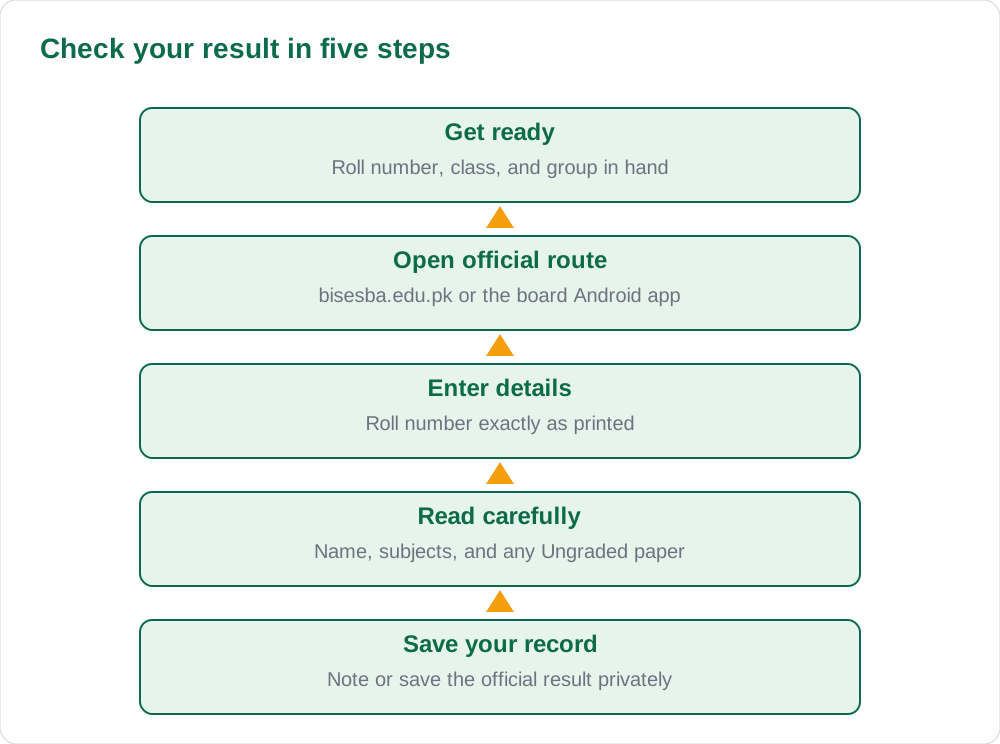
Before you open any website or application, gather what you need in one place: your roll number, your class and group, and a pen and paper for noting your result. Checking with everything ready takes a few minutes, while checking without your roll number leads to repeated attempts and frustration. If a parent or teacher is helping you, sit together so the result can be read calmly and noted correctly, subject by subject, rather than glanced at in a rush. Keep this point in mind as you plan your week, because a calm, organised, and steady approach usually protects both your time and your marks across every paper.
Also decide in advance that you will check only through official routes. The official website is www.bisesba.edu.pk, and the board also offers an Android application. Bookmark or open only those routes, and ignore links forwarded from unknown pages that promise faster results. The solved notes and the blog can help with later study planning, but for the result itself, only the official board source counts. Use this idea in your own plan, and check it against your own date sheet and admit card, so that nothing important is left to guesswork on the day itself.
- Keep your roll number, class, and group ready before checking
- Check with a parent or teacher nearby if possible
- Use only the official website or the board Android application
Step by Step on the Official Website
Open the official website at www.bisesba.edu.pk in your browser, and look for the Class IX Annual Examinations 2026 result section. Enter your roll number exactly as printed, choose your group if the form asks for it, and submit the form once, then wait for the page to load. Results pages can be slow when many students check at once, so do not submit repeatedly or refresh frantically: a single careful attempt, with a short wait, usually works better than many rushed ones. Remember this as you move to the next step, because steady preparation, clear documents, and enough rest together make a real difference on examination day.
When your result appears, read it slowly from top to bottom. Check your name and roll number first, then each subject, then the overall outcome. Note any paper marked Ungraded, which means under 40 percent and not passed in that paper. Write down or screenshot the result only for your own record, and do not share your roll details publicly. If the page fails to load, wait a while and try again later instead of turning to an unofficial site. Keep this point in mind as you plan your week, because a calm, organised, and steady approach usually protects both your time and your marks across every paper.
Step by Step on the Board Android Application
If you prefer a phone, the board's Android application offers another official route to the same result. Install only the board's own application from the proper app store, open it, and find the Class IX result section for the 2026 annual examinations. Enter your roll number carefully, submit once, and wait for the result to load. Keep your phone charged and your connection steady, because a weak connection can interrupt the check and force you to start again. Use this idea in your own plan, and check it against your own date sheet and admit card, so that nothing important is left to guesswork on the day itself.
Read the application result in the same careful way as the website result: name, roll number, subjects, and overall outcome, with special attention to any Ungraded paper. If the application and the website ever seem to disagree, trust the official board record and ask your school to help clarify, rather than believing screenshots shared online. Both official routes should show the same result, and your school can confirm the correct record if you are unsure. Remember this as you move to the next step, because steady preparation, clear documents, and enough rest together make a real difference on examination day.
- Install only the board's own Android application
- Enter your roll number carefully and submit once
- If routes disagree, ask your school to confirm the official record
Reading Your Result: Science Group Context
For context, the Science Group result shows 52,260 students registered, 51,546 appeared, and 41,425 successful, with an overall pass percentage of 79.02 percent. Those figures describe the Science Group cohort, and they help schools understand the overall picture, but they do not change your individual result. A student who passed and a student who did not pass can both sit inside the same group percentage, so read your own subjects first and the group figures second. Keep this point in mind as you plan your week, because a calm, organised, and steady approach usually protects both your time and your marks across every paper.
The General Group, announced on the same day, reported an overall pass rate of 52 percent, and its registered and appeared counts were not in the retrieved report. Do not mix the two groups when reading your result, and do not let a group figure decide how you feel about your own papers. Your next step comes from your own subjects, especially any Ungraded paper, and from guidance at your school. The textbooks can support revision for any subject you need to strengthen. Use this idea in your own plan, and check it against your own date sheet and admit card, so that nothing important is left to guesswork on the day itself.
- Science Group: 52,260 registered, 51,546 appeared, 41,425 successful, 79.02 percent
- General Group: 52 percent overall, announced the same day
- Read your own subjects first, group figures second
If Your Result Will Not Load or Looks Wrong
If the official page will not load, the most likely cause is heavy traffic, not a problem with your result. Wait, try again later, and try the other official route, website or application, before worrying. Check that you typed your roll number correctly, including every digit, because a single wrong digit can show no result or the wrong record. Ask a teacher or parent to check the number with you if repeated attempts fail. Remember this as you move to the next step, because steady preparation, clear documents, and enough rest together make a real difference on examination day.
If your result looks wrong, for example a name mismatch or a missing subject, do not share it online and do not accept an unofficial correction. Note exactly what looks wrong, save your official result record, and raise the matter with your school, which can guide you through the board's proper process. Keep calm, keep records, and follow the school's advice step by step. Most checking problems have a simple cause, and a careful, official approach resolves them far faster than rumours. Keep this point in mind as you plan your week, because a calm, organised, and steady approach usually protects both your time and your marks across every paper.
- Heavy traffic is the most common cause of a slow result page
- Recheck your roll number digit by digit before worrying
- If anything looks wrong, raise it with your school with your record ready
AI Help: Muse AI
Muse AI is Meta's personal AI assistant, and it can help you check and understand your Benazirabad 9th class result step by step. You can ask it to explain each part of your result in simple words and to list what to ask your teacher next. Join Muse with invite code LTGSWD — in the Muse app, go to Settings > Redeem token and enter the code. Disclosure: LTGSWD is the author's Muse invite code. Muse AI does not give official STBB answers — always verify against your STBB book and your teacher. Always verify against your Sindh Textbook Board book and your teacher before using anything in classwork.
5 key points you must know
- Class IX results for Science and General Groups were announced on 31 October 2026.
- Check only at www.bisesba.edu.pk or through the board Android application.
- Science Group: 52,260 registered, 51,546 appeared, 41,425 successful, 79.02 percent.
- Under 40 percent in a paper means Ungraded, which is not passed in that paper.
- If a result will not load, wait, recheck your roll number, and try the other official route.
Frequently asked questions
When was the Benazirabad Class IX result announced?
BISE Shaheed Benazirabad announced the Class IX Annual Examinations 2026 results for Science and General Groups on 31 October 2026. Check your individual result through the official website or the board application, and read each subject separately rather than relying on headlines.
Where is the official result website?
The official website is www.bisesba.edu.pk. The board also offers an Android application as another official route. Avoid unofficial pages that may mix groups, copy old figures, or ask for personal details you should not share with strangers online. Ask your teacher or school office if anything still looks unclear after checking the official source.
What Science Group figures were reported?
The Science Group reported 52,260 students registered, 51,546 appeared, and 41,425 successful, with an overall pass percentage of 79.02 percent. These are group figures only. Your own subject results decide your personal outcome and your next step. Ask your teacher or school office if anything still looks unclear after checking the official source.
What does Ungraded mean on my result?
Under the new grading decision, scoring under 40 percent in a paper means that paper is marked Ungraded, which means not passed in that paper. Check your result subject by subject, note any Ungraded paper, and ask your school about the proper next step.
What if my result page will not load?
Wait and try again later, because heavy traffic often slows official pages after an announcement. Recheck your roll number digit by digit, and try the other official route. If a genuine error remains, raise it with your school with your result record ready.
Solved notes — preview free
These guides work best with the solved exercises. Preview the solved notes free on this website — 119 solved notes for Classes 6–10 in Sindhi, Urdu, English and Arabic medium. Or browse the full solved notes catalogue for your class and medium. New solved notes are added regularly — check the catalogue for coming-soon books.